Photography · · 5 min read
White Background Product Photos: A Marketplace Image Guide for Indian Sellers

If you sell on a marketplace, the main image of every listing has probably been rejected, suppressed or quietly penalised at least once. The reasons are almost always the same: the background is not truly white, the product is too small in the frame, the image is too low in resolution or there is text or a watermark where there should not be. This guide covers what white-background product photos need in order to pass and, more importantly, convert.
Always check the current guidelines for each platform, because rules change. The principles below apply broadly.
Why marketplaces insist on white
White backgrounds keep search results consistent, so the product, not the staging, is what gets compared. They also make it easy for platforms to automate checks, which is why edges and background colour are so strictly judged. For you, white removes distraction and makes products look clean and trustworthy, provided the white is real and the product is lit properly.
Get the background genuinely white
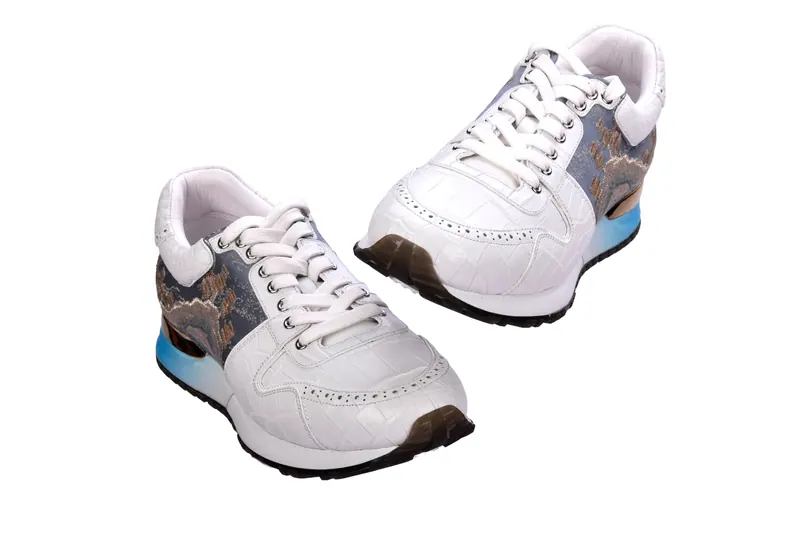
"Almost white" is the most common failure. Photograph on a white sweep or a light table, and light the background separately so it records as pure white without glowing around the product. Check the corners of the image, since they often fall off to grey. In editing, adjust levels so the background is pure white, but avoid clipping product edges or removing natural shadows entirely.
A subtle shadow beneath the product grounds it and avoids a floating look. Marketplaces generally allow this, but check for rules about reflections and added effects.
Fill the frame
Products that look small in the frame lose detail and fail checks that require a high proportion of the image to be product. Crop so the product takes up most of the frame, leaving a modest, even margin. Keep the product straight and centred, with no tilt unless the angle is intentional. For long items, such as pipes, use a landscape crop. For tall ones, a portrait or square crop.
Meet the resolution requirements
Zoom features depend on large images, and many platforms specify minimum dimensions on the longest side. Larger is generally better, so shoot and deliver at high resolution and let the platform scale it down. Avoid upscaling small images, which looks soft and may be rejected. Keep file formats and sizes within the limits stated by each platform.
Build the full image set
One main image is not enough. Shoppers expect a gallery that answers questions. A typical set includes the main front image, several angles, a close-up of key details, a scale or size reference, the product in packaging, and if relevant a lifestyle or in-use image. For products with variants such as colours and sizes, photograph each variant consistently. Infographics with dimensions, features or care instructions can be added as secondary images, but not as the main image on most platforms.
Keep the images honest
Colour must match the real product, or returns rise. Calibrate monitors, use consistent lighting, and match to a physical sample. Avoid heavy retouching that changes the product, such as smoothing surfaces that are textured in reality. Do not add badges, logos or text to the main image unless allowed. Honest images lead to fewer returns and better ratings.
Be consistent across the catalogue
A catalogue where every product is shot with the same angle, crop, shadow and white point looks like a single brand. This consistency makes browsing easier and builds trust. When you add new products, shoot them to the same standard, ideally in the same setup. Keep notes about the lighting, camera position and editing approach so future shoots match.
Common reasons for rejection
Images are often rejected because the background is not pure white, the product does not fill enough of the frame, there is text, a watermark or a border, the image is blurry or low resolution, multiple products appear when only one is allowed, or props are included in the main image. Fixing these usually involves re-editing or reshooting, so it is better to get it right at the start.
Add files for your own website
Marketplace images are a starting point. For your own store you can use the same images alongside lifestyle shots, detail images and perhaps a 360 degree spin. Export web versions that load quickly, and keep full-resolution masters for print and catalogues. A transparent PNG with a clean cut-out is useful for banners and social posts.
When to hire a studio
Smartphone photography can work for a handful of products, especially when you have good light and a simple setup. A studio makes sense when you have many products, difficult materials such as reflective metal or glass, strict marketplace requirements or a need for consistent quality across a large catalogue. Khobare Studio shoots white-background and styled product photography in Wakad, with files delivered in marketplace-ready sizes. Learn more on our product photography page, or add interactive views through 360 degree product photography.
A shot list template for a typical product
For most products, a reliable marketplace set looks like this: a main front-facing hero on pure white; a rear view; two side views; a top or three-quarter angle; a close-up of the most important feature, such as a logo, texture or connector; one image showing the product in its packaging or with accessories; one scale image beside a hand or familiar object; and optionally a lifestyle shot in use. For variants, repeat the hero and one angle per colour or size. Having this list ready before the shoot saves time and keeps your catalogue consistent.
Keep your masters and your exports separate
Store the full-resolution original files and the edited masters safely, and create platform exports from them, not the other way round. Keeping layered or transparent versions means you can produce banners, social posts and print layouts later without going back to the studio. Name files clearly, with product code and angle, so teams and uploaders can find the right image in seconds.
Final thoughts
A white-background photo that passes the marketplace check is table stakes. One that also shows the product honestly, from useful angles, in consistent style is what actually sells. Get the background right, fill the frame, deliver high resolution, build a full image set and keep everything consistent. The listings that do this tend to win the click, the cart and the repeat order.
Related service
Product Photography in Pune
Catalogue, e-commerce and campaign packshots that convert.